
APP REVENUE DATA INFRASTRUCTURE
App Revenue
Warehouse Explorer
See the reporting layer before you choose the pipeline.
Inspect what Netice delivers from Apple App Store and Google Play into your own warehouse: source reports, schema fields, example rows, SQL and refresh behavior.
SELECTED WORKFLOW
Apple + Google · Daily App Sales → BigQuery
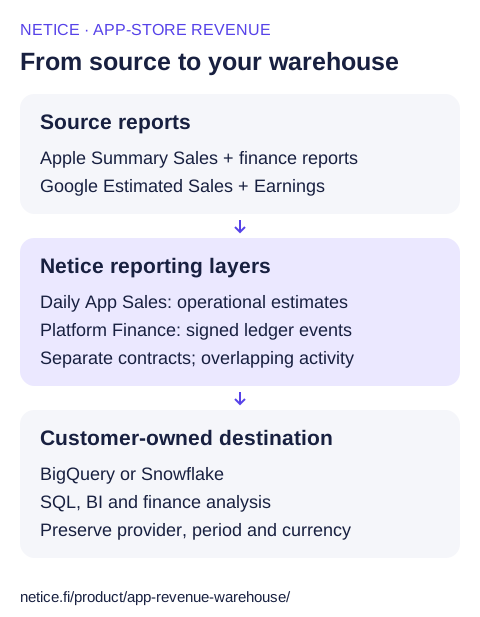
Netice delivers Apple App Store and Google Play daily sales reporting into a customer-owned BigQuery table using the 38-field Daily App Sales schema. Use estimated_net for operational trends, retaining the report currency and method fields with the amount.
Source reports
Reporting layer
Daily App Sales
Operational estimatesYour warehouse
BigQuery
app_sales_dailyINSPECT THE OUTPUT
app_sales_daily
Default table name; replace the fictional project and dataset with your destination. The full BigQuery table path is enclosed in backticks.
Example rows
11 selected fields from the 38-field Daily App Sales contract.
revenue_date | source | app_id | source_report | report_currency | estimated_net | net_method | data_completeness | units | transaction_type | event_has_revenue |
|---|---|---|---|---|---|---|---|---|---|---|
2026-08-14 | APPLE_APP_STORE | 1234567890 | ASC_SUMMARY_SALES | EUR | 14 | APPLE_PROCEEDS | T_PLUS_2_STABILIZED | 2 | PURCHASE | true |
2026-08-15 | APPLE_APP_STORE | 1234567890 | ASC_SUMMARY_SALES | EUR | -7 | APPLE_PROCEEDS | T_PLUS_2_STABILIZED | -1 | REFUND | true |
2026-08-15 | APPLE_APP_STORE | 1234567890 | ASC_SUMMARY_SALES | EUR | 21 | APPLE_PROCEEDS | T_PLUS_2_STABILIZED | 3 | RENEWAL | true |
2026-08-14 | GOOGLE_PLAY | com.example.orbit | GP_ESTIMATED_SALES | EUR | 8 | GOOGLE_ESTIMATED_NET_FROM_CHARGED_AMOUNT_MINUS_ESTIMATED_FEE | T_PLUS_2_STABILIZED | 1 | PURCHASE | true |
2026-08-15 | GOOGLE_PLAY | com.example.orbit | GP_ESTIMATED_SALES | EUR | -8 | GOOGLE_ESTIMATED_NET_FROM_CHARGED_AMOUNT_MINUS_ESTIMATED_FEE | T_PLUS_2_STABILIZED | -1 | REFUND | true |
2026-08-15 | GOOGLE_PLAY | com.example.orbit | GP_ESTIMATED_SALES | EUR | 0 | GOOGLE_NET_UNAVAILABLE_ASSUMED_ZERO | T_PLUS_2_STABILIZED | 1 | PURCHASE | true |
- The example report currency is EUR; it is configurable.
- Negative units and amounts represent refunds. A method-labelled zero is an assumption, not a source-reported zero.
- T_PLUS_2_STABILIZED is an age-based label; it does not certify settlement or complete reporting.
Inspect all 38 fields
Logical output types. See the schema reference for field meanings and source-specific availability.
| Field | Logical type |
|---|---|
revenue_date | Date |
platform | Text |
app_id | Text |
source_kind | Text |
source | Text |
country | Text |
report_currency | Text |
estimated_gross | Number |
estimated_net | Number |
estimated_tax | Number |
estimated_fee | Number |
native_currency | Text |
gross_local | Number |
net_local | Number |
tax_local | Number |
fee_local | Number |
apple_proceeds_currency | Text |
apple_proceeds_native | Number |
gross_fx | Number |
net_fx | Number |
tax_fx | Number |
fee_fx | Number |
net_method | Text |
fee_method | Text |
tax_method | Text |
data_completeness | Text |
source_report | Text |
event_has_revenue | Boolean |
subscription_period | Text |
units | Number |
item_id | Text |
item_name | Text |
transaction_type | Text |
source_file_uri | Text |
source_row_number | Integer |
source_row_hash | Text |
ingested_at | Timestamp |
meta_json | JSON text |
QUERY THE RESULT
Questions this output can answer
Replace the example project, dataset or database identifiers with your destination.
Daily estimates by app and store
Keep app, report currency and source in the grouping. The assumption count identifies zero fallbacks, not every possible quality issue.
SELECT revenue_date, source, app_id, report_currency,
       SUM(estimated_net) AS estimated_net_total,
       COUNT(*) AS revenue_rows,
       COUNTIF(net_method LIKE '%ASSUMED_ZERO%') AS assumed_zero_net_rows
FROM `example-project.analytics.app_sales_daily`
WHERE revenue_date >= DATE '2026-08-01'
  AND revenue_date < DATE '2026-09-01'
  AND source IN ('APPLE_APP_STORE', 'GOOGLE_PLAY')
  AND event_has_revenue = TRUE
GROUP BY revenue_date, source, app_id, report_currency
ORDER BY revenue_date, source, app_id, report_currency;
See which estimation methods drive the total
Inspect methods and age labels alongside amounts. Numeric values can include calculations and assumptions.
SELECT source, report_currency, net_method, fee_method, tax_method, data_completeness,
       COUNT(*) AS revenue_rows,
       SUM(estimated_net) AS estimated_net_total
FROM `example-project.analytics.app_sales_daily`
WHERE revenue_date >= DATE '2026-08-01'
  AND revenue_date < DATE '2026-09-01'
  AND source IN ('APPLE_APP_STORE', 'GOOGLE_PLAY')
  AND event_has_revenue = TRUE
GROUP BY source, report_currency, net_method, fee_method, tax_method, data_completeness
ORDER BY source, report_currency, net_method, fee_method, tax_method, data_completeness;
Inspect signed refunds
Refund rows carry signed units and amounts. This query isolates refunds; it is not a total-revenue calculation.
SELECT revenue_date, source, report_currency,
       COUNT(*) AS refund_rows,
       SUM(units) AS signed_refund_units,
       SUM(estimated_net) AS estimated_refund_net
FROM `example-project.analytics.app_sales_daily`
WHERE revenue_date >= DATE '2026-08-01'
  AND revenue_date < DATE '2026-09-01'
  AND source IN ('APPLE_APP_STORE', 'GOOGLE_PLAY')
  AND event_has_revenue = TRUE
  AND transaction_type = 'REFUND'
GROUP BY revenue_date, source, report_currency
ORDER BY revenue_date, source, report_currency;
REFRESH AND HISTORY
What a rerun changes
A recent 7-day reporting window by default
- The recurring daily window supports 1–70 days.
- Reruns replace the relevant source and reporting-date scope; managed history outside that scope is retained.
- Backfills depend on reports still available from the provider. A refresh window cannot guarantee every future correction.
BEFORE YOUR FIRST RUN
Setup requirements
Apple App Store
- Use an App Store Connect team API key with its issuer ID, key ID and private key; individual keys cannot access Sales and Finance endpoints.
- Provide the vendor number for Sales and Trends reporting.
Google Play
- Use the Play Console reporting bucket beginning with pubsite_prod_rev, not your destination or staging bucket.
- Grant the reporting service account account-level bulk-report read access and financial-data access in Play Console.
- Choose a saved connection or the access path shown in setup; managed Google Play access is source-only.
BigQuery
- Prepare the customer-owned project and dataset, plus a GCS staging bucket in a compatible location.
- Grant roles/bigquery.jobUser on the job project and roles/bigquery.dataEditor on the selected dataset. Data Editor includes table lifecycle permissions; keep it scoped to a dedicated dataset.
- The guided setup uses Storage Object User on the staging bucket. Restrict a shared bucket to the task's staging scope; precreate resources to avoid unnecessary resource-creation grants.
- Configure source access separately, choose reporting currency and run a small available reporting window.
- For a new managed daily table, choose an unused name; keep an existing task on its established target.
Keep these boundaries in your model
- Daily estimates are separate from monthly Platform Finance; adding both outputs double-counts overlapping activity.
- Missing daily report-currency amounts can be derived or assigned zero under an explicit method label. Finance uses a different null contract.
- Apple customer and proceeds currencies can differ. A null net_local can coexist with apple_proceeds_native; read it with apple_proceeds_currency.
- Google Estimated Sales is a changing monthly source file containing daily activity. Recently charged or refunded transactions can appear later.
Raw Reports delivers provider-native rows and columns in managed GCS or S3 files. It is a separate workflow from these normalized warehouse outputs. View Raw Reports →
WHO OPERATES THE PIPELINE?
Build it yourself, or run it with Netice.
A capable data team can build this internally. Netice exists for teams that prefer not to own this integration and maintenance surface.
Compare the operating responsibilities
| Responsibility | Build internally | Run with Netice |
|---|---|---|
| Connect | Implement provider authentication, destination access and credential-rotation paths. | Configure source and destination connections. Your team grants access and rotates provider credentials. |
| Interpret | Select report families; retrieve and parse reports; maintain Apple/Google mappings, source provenance, currencies and missing-value rules. | Use the maintained Daily App Sales or Platform Finance contract, with source context and layer-specific amount semantics. |
| Refresh | Operate scheduling, late-arriving reports, historical backfills, retries and repeatable writes without accumulating duplicate loads. | Configure recurring refreshes and backfills. Netice updates the managed output for the selected reporting scope. |
| Maintain | Track provider/schema changes and maintain the warehouse merge or replacement behavior. | Use Netice's supported source transformations and managed destination updates. Keep downstream models aligned with the documented schema. |
| Diagnose | Build monitoring, run status and failure diagnostics for source, transformation and destination errors. | Review task status, check the failing access/reporting boundary and use support when needed. |
Your team retains control of access grants, destination costs, downstream models, snapshots and financial interpretation in either approach.
Build internally
Use the report-family references, schema dictionaries and SQL examples to define the data model your team needs.
Review the implementation surfaceRun it with Netice
Connect the stores, choose your destination and configure the reporting workflow.
View current pricingRUN THE EXAMPLES
Take the schemas and SQL into your own warehouse.
Download the complete field contracts, example data, BigQuery and Snowflake DDL, and 12 SQL recipes. The package includes executable checks and loading instructions.
Daily App Sales JSON Schema · Platform Finance JSON Schema · Daily CSV · Finance CSV
Compare Netice with building and maintaining your own pipeline.